• Home
  • About Me
  • Musings
  • Programming
  • Computers
  • Open Source
  • Society
  • Books
  • Design
  • Movies
  • Uninstalling MySQL on Mac OS X

    Posted on January 1st, 2010 by Rajeshwaran S P

    Here are the steps to perform a clean un-install of MySQL from your Mac.

    Execute the following commands at the Terminal
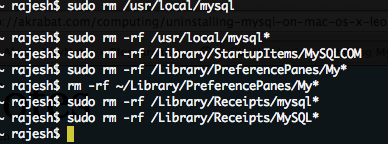
    Uninstalling MySQL

    Open /etc/hostconfig file in a text editor and remove the following line

    MYSQLCOM=-YES-

    That’s all.

    Possibly Related posts:

    1. Rails: Error with MySQL in welcome screen After installing rails, to test it, I created a rails...
    2. Installing LAMP in Ubuntu Following are the steps to get Apache, MySQL and PHP...
    3. Installing Rails : Local gem install After a unsuccessful installation of rails that took nearly 5...
    4. Free Software I am writing this post using WriteRoom, one super working...
    5. Dual booting Ubuntu and XP Starting out on the Open Source fever, I installed Mandriva,...

    Tags: ,

    Leave a Reply